Career Restart
Your LinkedIn Profile After a Career Break: What Recruiters Actually Search For
Sumit Saxena · Delivery Lead · · 22 min read
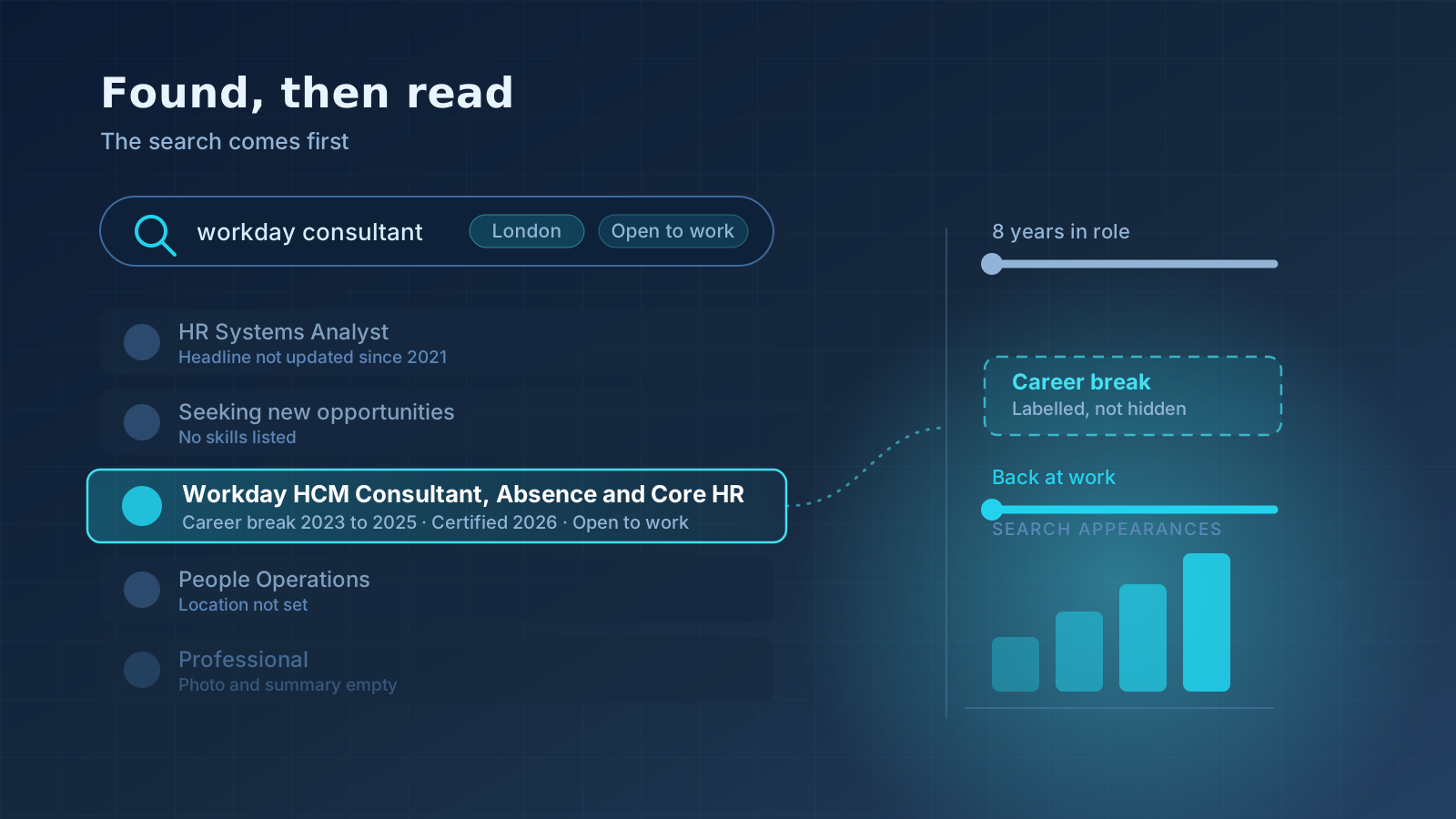
You have rewritten your LinkedIn summary three times this month. You have added the certification you finished during the break. You checked the box that says you are open to work. And still, almost nothing comes in. Maybe one message from a consultant who clearly did not read the profile, offering a role in a city you cannot move to.
The natural conclusion is that recruiters are seeing the break and moving on.
That is almost never what happened. In most cases the recruiter never saw your profile at all, because your name was not in the list of results they were looking at. This is the part that gets missed. Your LinkedIn profile is not a document that people read. It is a record that people search. And after a career break, the search is where you lose, long before anybody forms an opinion about the gap.
Most of my week is spent on the other side of that search box, sourcing and submitting candidates to employers. So this article is written from there. Not “make your profile stand out,” but what is actually typed into the search, which fields it reads, and what has to be sitting in each section of your profile for your name to come back.
The problem, stated plainly
There are two completely separate stages, and returners usually optimise for the wrong one.
Stage one is retrieval. A recruiter types a search. LinkedIn returns a list of names. This stage is mechanical. It is keyword matching against a handful of specific fields on your profile. Nobody is reading anything. Nobody has an opinion about your break, because nobody knows it exists.
Stage two is evaluation. The recruiter opens maybe fifteen of those profiles and looks at each one for a few seconds. This is the stage where a break gets noticed, and where a well-handled break stops being an issue.
Almost every returner I speak to has spent their effort on stage two. They have polished the wording of their summary and worried about how to phrase the gap. Meanwhile the profile is invisible at stage one, so the careful wording never gets seen.
Fix retrieval first. Then fix evaluation. In that order.
Why it happens: the mechanism, not the platitude
Here is what actually goes on. A client sends me a requirement. I open LinkedIn Recruiter, or plain LinkedIn if the mandate is small, and I build a search out of the job description. For a functional consultant requirement it might be:
(“Oracle HCM” OR “Oracle Fusion HCM”) AND (“Core HR” OR “Absence Management”) AND (Consultant OR “Functional Consultant”) AND India
That query is matched mostly against a narrow set of fields:
| Field | Weight in retrieval |
|---|---|
| Headline | Very high. The most-read line, and heavily weighted in keyword matching |
| Current and past job titles | Very high. Filters exist specifically for these |
| Skills | High. There are dedicated skill filters recruiters use constantly |
| About section | Medium. Read by keyword search, not by the structured filters |
| Experience descriptions | Medium |
| Location | Hard filter. Wrong location and you are excluded outright |
| Certifications, education, languages | Low to medium, used mainly to narrow a long list |
| Your posts and comments | Not searched at all in this stage |
Now look at what a typical post-break profile has in those fields.
The headline says “Seeking new opportunities | Open to work | Immediate joiner.” Zero role keywords. The current position field is empty, or shows a company that closed two years ago. The skills list has thirty items added over a decade, with “Microsoft Office” and “Teamwork” sitting at the top. The location still says the city they left in 2023.
That profile does not appear in my search. Not because of the break. Because there is nothing in it to match.
The break itself gets punished in a second, quieter way. When the current position is empty, LinkedIn has nothing to show under your name in the result row. Every other result in my list shows “Senior Business Analyst at [Company]”. Yours shows a role that ended two years ago, or nothing. In a list of forty rows scanned quickly, that blank is a reason to skip.
What the recruiter is actually thinking
It is worth being honest about this, because returners tend to imagine a harsher process than the real one.
When I open a profile with a visible break, my internal questions are short and practical:
- Can this person do the work described in the requirement? That is ninety percent of it.
- Are they available now, and for what kind of engagement?
- Is there anything recent I can point to when the client asks “what have they been doing”?
- Will their answer about the break be comfortable, or will it turn into an awkward twenty minutes with my client?
That is the whole list. Notice what is not on it: judgement about why you took the break. I have submitted candidates returning from caregiving, health, relocation, visa waits, failed ventures, and long notice periods that went wrong. Employers ask about the time. They do not usually hold it against you.
What I genuinely cannot work with is a profile that leaves me guessing. If I have to reconstruct your timeline, or I cannot tell whether you are targeting business analysis or project management, or your last dated anything is from 2023, I move to the next name. Not out of prejudice. Out of volume.
Recruiter tip: Give the recruiter the answer before they have to ask for it. A labelled break with one line of context takes you from “unknown” to “understood” in about two seconds, and unknown is the only one of those two that loses you the call.
The rebuild, section by section
Work top to bottom. The order below is roughly the order of impact.
1. The headline: your single highest-value line
This is the field that decides retrieval more than any other, and it is the one returners most often waste.
The formula that works:
Target job title | Two or three specific tools or specialisms | One line of context
Around 220 characters are available, so use them. Some before and after examples:
| Before | After |
|---|---|
| Seeking opportunities | Immediate joiner | Oracle HCM Functional Consultant | Core HR, Absence, Payroll Integrations | Available immediately |
| Experienced IT professional | Open to work | QA Automation Engineer | Selenium, Java, TestNG, API Testing | Returning to work after a planned break |
| MBA | Ex-Cognizant | Looking for a change | Business Analyst | Requirements, User Stories, SQL, Stakeholder Workshops | BFSI domain |
| Passionate about people and culture | HR Generalist | Payroll, Onboarding, HRMS Implementation | 7 years, returning after caregiving break |
| Java Developer (2015 to 2023) | Java Backend Developer | Spring Boot, Microservices, REST APIs, AWS | Available for contract or full time |
Three rules for the headline:
- Lead with the job title you want next, in the exact words a job advert would use. Not the title you last held, if they differ. Not a creative version of it. If job adverts say “Business Analyst”, write Business Analyst, not “Business Problem Solver”.
- Never lead with your availability. “Immediate joiner” and “Open to work” match no requirement anybody is searching for. If you want them there, put them last.
- Use the tool names, spelt the way the market spells them. Selenium. Workday. Power BI. SAP SuccessFactors. These are the exact strings sitting in recruiters’ saved searches.
2. Job preferences and the two Open to Work settings
LinkedIn has two different open-to-work settings and they do very different jobs.
| Setting | Who sees it | What it does |
|---|---|---|
| Share with all LinkedIn members | Everyone, as the green #OpenToWork photo frame | Signals availability publicly. Optional, and a matter of personal preference |
| Share with recruiters only | Only recruiters using LinkedIn Recruiter | Puts you into a spotlight recruiters can filter their results by. This one materially increases how often you surface |
Turn on the recruiter-only setting. It is the higher-value one, and it is private.
The green frame is a genuine judgement call. It makes you easier to spot and signals that outreach is welcome. Some candidates worry it reads as desperation. After a career break the calculation is simpler than usual: you are not trying to keep a current employer from noticing, and visibility is the scarce thing. I would switch it on.
Then fill in the job preference fields properly, because they feed recruiter filters: job titles you want (add three or four variations, not one), locations including remote, start date, and job types. If you would take a contract, tick contract. A large share of the work available to returners is contract-to-hire, and it is often the fastest route back.
3. Add the Career Break entry
LinkedIn has a proper employment type for this. Use it.
To add it: go to your profile, choose Add profile section, then Add position, and set the employment type to Career Break. LinkedIn then offers a reason, with options including caregiving, full-time parenting, health and well-being, relocation, layoff or position eliminated, professional development, travel, bereavement, and career transition. Pick the closest fit. If none of them fits comfortably, career transition is a neutral, honest default.
Give it a start month and an end month. If you are still on the break, leave it current until your first day somewhere new.
Then write one or two lines. Short. Factual. Forward-facing.
Career Break · Caregiving Mar 2024 to present
Planned break to manage a family caregiving responsibility, now concluded. Kept current with Workday releases and completed the Workday Pro Core HCM certification in Jan 2026. Actively interviewing for functional consultant roles from March.
Or:
Career Break · Layoff / position eliminated Aug 2024 to Jun 2026
Role eliminated in a company-wide restructure. Took on two short freelance QA automation engagements and refreshed my Selenium and API testing skills. Available immediately, open to contract or permanent.
What makes these work is not the explanation. It is that the timeline is now continuous, the reason is stated without drama, and there is something dated and recent inside the break.
What does not work: leaving it blank and hoping nobody notices, writing a paragraph of justification, or inventing a consultancy that does not exist. That last one is more common than you would think, and it falls apart at background verification.
A warning worth stating clearly. Do not create a fake company or backdate a freelance business to cover the period. Employers in the US, UK and increasingly in India run employment verification, and a fabricated employer is a withdrawn offer, not a caught mistake. A labelled break costs you far less than a discovered lie.
4. The About section: written for a person, structured for a search
The About section holds around 2,600 characters. The first two lines are what shows before “see more” is clicked, so they carry the weight.
Structure that works after a break:
- What you do and at what level, in one sentence
- Your two or three strongest, most specific capabilities
- A single plain sentence about the break and that it has ended
- What you are looking for now, concretely
- A keyword block, so the search picks up terms your job titles do not carry
A worked example:
I am a Business Analyst with seven years in retail banking, specialising in requirements gathering and process redesign for core banking and payments platforms.
Most of my work has been the unglamorous middle of a project: sitting with operations teams to understand what they actually do, turning that into user stories a development team can build from, and staying with it through UAT. On my last programme I documented the requirements for a payments reconciliation rebuild that cut manual matching work substantially for the operations team.
I took a two-year break from mid-2024 for caregiving reasons. That has now concluded. During it I completed the IIBA ECBA certification and stayed close to the domain through a short freelance process-mapping engagement in early 2026.
I am now looking for a Business Analyst or Senior Business Analyst role in BFSI, in Pune or Bengaluru or remote, open to contract or permanent, and available to start immediately.
Areas I work in: requirements elicitation, BRD and FRD authoring, user stories, Agile and Scrum, UAT coordination, SQL, JIRA, Confluence, Visio, process mapping, stakeholder workshops, core banking, payments, reconciliation.
That last line looks blunt on the page. It is doing real work. It puts twenty searchable terms into a field the search engine reads, without contorting the prose above it.
Two things to avoid. Do not open with the break, because the first thing a reader sees becomes the headline of their impression. And do not write in the third person. It reads as a corporate bio and nobody has spoken that way since 2012.
5. Experience: fix the last real role before you worry about the gap
The break gets all the attention, and meanwhile the roles above it are written as duty lists that could describe anyone.
| Before | After |
|---|---|
| Responsible for testing of web applications | Built and maintained a Selenium and TestNG regression suite of around 400 cases, cutting a two-day manual regression cycle to an overnight run |
| Handled payroll for the organisation | Ran monthly payroll for 1,200 employees across three entities in SAP SuccessFactors, including statutory compliance for PF, ESI and TDS |
| Worked closely with stakeholders | Ran fortnightly requirement workshops with operations, risk and compliance leads, and resolved sign-off conflicts before they reached the steering committee |
| Involved in implementation of Workday | Configured Core HR and Absence for a 3,000 employee Workday implementation, owning the leave policy build and two rounds of UAT defect resolution |
The pattern is: what you did, with which tool, at what scale, with what result. Scale numbers matter more than most people realise, because they tell a recruiter whether your experience is comparable to the requirement. “Handled payroll” could be twelve people or twelve thousand. Those are different candidates.
While you are here, make sure the dates on LinkedIn match the dates on your CV exactly, including months. A mismatch reads as concealment even when it is just a typo, and it is one of the few things that reliably kills a submission. If you are not sure how the two read side by side, send your CV to us for a review and we will tell you where they disagree.
6. Skills: the most under-used filter on the platform
You can list up to fifty skills, and you can pin three to the top. Recruiters filter by these directly, so treat the list as a targeted keyword set, not an inventory of everything you have ever touched.
- Pin the three that match the role you want, not the three you are proudest of. For a Workday consultant that is Workday, Workday HCM, and Absence Management. Not Leadership.
- Delete the generic ones. Microsoft Office, Teamwork, Communication, Time Management. They match nothing anyone searches for and they dilute the list.
- Add the variants people actually search. Both “Oracle Fusion HCM” and “Oracle HCM Cloud”. Both “Test Automation” and “Selenium”. Recruiters do not standardise, so you should cover the spellings.
- Attach skills to specific roles where LinkedIn offers it. It makes the claim look evidenced rather than declared.
- Endorsements help a little, not a lot. Do not spend a week chasing them. Two or three on your pinned skills is enough.
7. The parts everyone skips, that take ten minutes
- Location. Set it to where you can actually work now. This is a hard filter. A returner who has moved back to Hyderabad but whose profile still says Chicago will not appear in a single Hyderabad search. If you are open to relocating, add those cities to your job preferences.
- Custom URL. Claim linkedin.com/in/yourname. It goes on your CV and it takes thirty seconds.
- Photo. A clear, current, front-facing photo. It does not need to be professionally shot. It does need to be recent, because a photo that is obviously ten years old raises the wrong question about how current everything else is.
- Banner. Even a plain colour with your target role on it is better than the default grey. It is the first thing on the page.
- Featured. Pin the certification you finished during the break, or a process document, or a case study. It is the fastest way to make recent activity visible.
- Certifications. Add them with their actual issue dates. Anything dated in the current year does disproportionate work, because it is the first evidence a recruiter finds that you are current.
- Contact info. Put a working email and phone number in the contact panel. A surprising number of returners have neither, then wonder why nobody reaches out. Recruiters often have limited InMail credits and will simply skip a profile they cannot email.
- Recommendations. Two are plenty. Ask a former manager and a former peer, and give them something to work from rather than a blank request.
Here is a request message that gets a reply:
Hi Ravi, I hope you are keeping well. I am starting to interview again after my break and I am rebuilding my LinkedIn profile. Would you be willing to write a short recommendation? If it helps, the parts most relevant to what I am targeting now are the reconciliation requirements work and the UAT coordination on the payments programme. Two or three lines is more than enough, and no problem at all if you would rather not.
Three worked profile makeovers
A. Oracle HCM consultant, two-year break, returning in India
| Section | Before | After |
|---|---|---|
| Headline | Oracle Professional | Seeking opportunities | Oracle HCM Functional Consultant | Core HR, Absence, OTL | 8 years | Available immediately |
| Current position | Empty | Career Break · Professional development, Jun 2024 to present |
| About opening line | “I am a hardworking professional with excellent communication skills” | “Oracle HCM functional consultant with eight years across Core HR, Absence and Time and Labour, including three end-to-end implementations.” |
| Pinned skills | Leadership, Communication, MS Excel | Oracle HCM Cloud, Absence Management, HCM Data Loader |
| Featured | Nothing | Oracle HCM Cloud certification, dated Feb 2026 |
B. QA engineer, maternity break, returning to contract work
| Section | Before | After |
|---|---|---|
| Headline | Software Tester | Career break | Restarting | QA Automation Engineer | Selenium, Java, TestNG, REST Assured | Open to contract |
| Career break entry | Not present | Career Break · Full-time parenting, Apr 2024 to Aug 2026, with a line on the Playwright course completed in 2026 |
| Experience bullets | “Performed manual and automation testing” | “Owned a 400 case Selenium regression suite; reduced regression cycle from two days to an overnight run” |
| Job preferences | Off | Contract and full time ticked, three title variants, remote included |
C. Business Analyst, relocated from the US to India
| Section | Before | After |
|---|---|---|
| Location | Dallas, Texas | Pune, Maharashtra, India |
| Headline | Senior BA | Ex-US | Relocating | Senior Business Analyst | BFSI, Payments, SQL, Agile | Relocated to Pune, available now |
| Career break entry | Not present | Career Break · Relocation, Nov 2025 to Jun 2026 |
| About | US-centric, no India context | Opens with domain and level, states the relocation is complete, names target cities |
The pattern across all three is the same. Nothing was invented. The information was already true. It was just sitting in fields nobody searches, written in words nobody types.
When recruiters do reach out: what to reply
Getting found is the point of all of the above. Replying well is what turns it into a submission.
Replying to a relevant recruiter message:
Hi Priya, thank you for reaching out, and yes, I am interested. Quick context so you have the full picture: I have eight years in Oracle HCM functional work, and I took a two-year break for caregiving that ended this June. I am available immediately and open to contract or permanent. I have attached my CV. Happy to talk any time this week, and my number is below if a call is easier.
Three things that message does. It says yes clearly, it puts the break on the table before the recruiter has to ask, and it removes the next two rounds of back and forth by giving availability and contact details up front. As a recruiter, that reply moves you to the top of my list purely because it costs me less work.
Reaching out to a recruiter cold:
Hi Anil, I saw you are hiring for Workday functional roles. I am a Workday HCM consultant with six years across Core HR and Absence, including two full implementations. I have been on a caregiving break that ended in May and I am available immediately, open to contract. If you have anything current where that fits, I would be glad to send my CV.
Keep it to five lines. Say the role, the years, the availability, and one specific thing. Do not attach a file to a first message and do not open with “I hope this message finds you well.”
Following up after silence, once, after about a week:
Hi Anil, following up on my note from last week about Workday functional roles. Still available and still interested. If nothing is open right now, no problem at all, just keep me in mind for the next one.
One follow-up. Then leave it. A second and third chase changes how you are remembered, and not for the better.
Does posting on LinkedIn help you get hired after a break?
It helps, but less than the advice industry suggests, and in a specific way. Posting does not put you into search results. Search does not index your posts for candidate retrieval. What activity does is change how your profile reads once a recruiter has already opened it. A profile whose last activity was in 2023 looks dormant. A profile with a comment from last week looks like a working professional who happens to be between roles.
So the useful cadence is modest:
- One short post a week about your actual function. Something you learnt, a change in a product you work with, a practical tip. Not a motivational essay about resilience.
- Two or three comments a week on posts by people in your field, saying something substantive rather than “Great post.”
- Follow the companies you want to work for and the recruitment firms that staff them.
That is around twenty minutes a week. Anything more is usually procrastination dressed up as job searching, and the applications are what actually produce interviews.
Common mistakes
| Mistake | Why it costs you | Do this instead |
|---|---|---|
| Headline says “Open to work” and nothing else | Matches no search anybody runs | Lead with the target job title and your tools |
| Current position left empty | Your result row looks blank next to forty others | Add the Career Break entry so the row reads properly |
| Hiding the break with stretched dates | Fails employment verification, and offers get withdrawn | Label it honestly with one line of context |
| Explaining the break in three paragraphs | Signals you think it is disqualifying | Two lines, then move on to what you want next |
| Location left as the old city | Hard filter, you are excluded before evaluation | Set it to where you can work now |
| Fifty generic skills, none pinned | Recruiter skill filters cannot find you | Fifteen specific ones, three pinned to the target role |
| LinkedIn and CV dates disagree | Reads as concealment, kills submissions | Make them identical, month by month |
| No email or phone in contact info | Recruiters with no InMail credits skip you | Add both |
| Waiting for the profile to be perfect before applying | The profile does not generate the interviews, the applications do | Give it one focused day, then start applying |
Recruiter tips you will not read elsewhere
- Target titles, not seniority. After a break, searching only for “Senior” versions of your title cuts your visible market roughly in half for very little gain. Get the recent role on the profile first. The seniority conversation is much easier from inside a job.
- Contract work is not a downgrade for a returner, it is a shortcut. Contract roles have shorter hiring cycles, fewer approval layers, and hiring managers who care more about whether you can do the work on Monday than about a tidy timeline. Ticking “contract” in your job preferences opens a meaningful part of the market that is often faster to convert.
- Update something on the profile every week. Small edits keep you appearing in the “recently updated” signals recruiters notice, and it costs nothing.
- The break entry should end when you start work, not when you started looking. Job searching is not a job, and a break entry that ends the month you began applying leaves a second, unexplained gap.
- Do not delete old short roles to look more stable. Gaps created by deletions are more suspicious than the short roles were.
- If you are an experienced professional, you probably do not need a training course to get back in. What you need is targeting and submissions. This is exactly what standalone job support is for, with no course attached.
Your LinkedIn rebuild checklist
Give it one focused day. Not a month.
- Headline leads with the target job title, then two or three tools
- Availability, if mentioned, is at the end of the headline and not the start
- Career Break entry added, with a reason, start and end months, and two lines of context
- Current position field is not empty
- About opens with what you do and at what level, not with the break
- About states plainly that the break has ended and what you want next
- Keyword line at the end of About covering terms your titles do not carry
- Last two roles rewritten with tool, scale and result in each bullet
- Skills trimmed to around fifteen specific ones, with three pinned to the target role
- Generic skills removed
- Location set to where you can actually work now
- Job preferences filled in: three or four title variants, locations, remote, start date, contract ticked if acceptable
- Open to Work turned on for recruiters, at minimum
- Email and phone number in contact info
- Custom LinkedIn URL claimed
- Current photo and a banner that is not the default grey
- Certification from the break period added, with its real date, and pinned to Featured
- Two recommendations requested
- LinkedIn dates and CV dates match exactly, month by month
- Applications started, without waiting for anything above to be perfect
Frequently asked questions
How do I add a career break to my LinkedIn profile?
Open your profile, click Add profile section, choose Add position, and set the employment type to Career Break. Pick the reason that fits, such as caregiving, health and well-being, relocation or layoff. Add the start and end month, then one short line of context. It appears in your Experience section as a normal entry, so the timeline has no unexplained hole.
What should my LinkedIn headline say during a career break?
Use the job title you want next, followed by your two or three strongest tools or specialisms. Recruiters search by role title, so a headline reading Seeking opportunities matches nothing. Something like Oracle HCM Functional Consultant, Core HR and Absence, Payroll Integrations puts you inside the searches your target employers are already running.
Do recruiters filter out candidates with employment gaps on LinkedIn?
There is no LinkedIn filter for gaps, so nobody is screening you out with a checkbox. What removes you is the keyword search. If your headline, skills and job titles do not carry the words the recruiter typed, you never appear in the result list, and the break is never even seen. Being invisible is the real problem.
Should I turn on Open to Work after a career break?
Turn on the recruiter-only version. LinkedIn offers two settings: a public green photo frame visible to everyone, and a private one shared only with recruiters using LinkedIn Recruiter. The recruiter-only setting adds you to a spotlight recruiters filter by, which genuinely raises how often you surface. The public frame is optional and a matter of preference.
Does posting on LinkedIn help you get hired after a break?
It helps, but less than people expect and in a specific way. Posting does not put you in search results. What it does is warm the profile a recruiter has already opened, because a profile with recent activity reads as an active, available professional. One useful post a week about your function is enough. Commenting counts.
Can experienced candidates get job support without training?
Yes. Experienced professionals returning after a break usually do not need a training course, they need targeting, positioning and submissions. Campus4tech offers standalone job support with no course attached, covering profile and CV rebuilds, applications, employer submissions and interview preparation. We continue working with candidates until they are successfully placed.
Summary
The break is not what is keeping recruiters away. Invisibility is.
Your profile has two audiences and they behave completely differently. The first is a search query that reads your headline, your job titles, your skills and your location, and returns a list of names. The second is a human being who spends a few seconds on a page. Almost every returner writes for the second audience and is never reached by the first.
So do it in this order. Put the target job title in your headline. Add the Career Break entry so your current position is not blank and your timeline is continuous. Trim your skills to the fifteen that match the job you want. Fix your location. Fill in your job preferences and turn on the recruiter-only Open to Work setting. Then rewrite the About section for the human, opening with what you do and giving the break two honest lines in the middle rather than the top.
Give it one day. Then start applying, because the profile makes you findable, and the applications are what produce the interviews.
If you have the experience but your search has gone quiet, this is the situation our job support for experienced professionals is built for: profile and CV positioning, targeted applications, employer submissions and interview preparation, with no training course attached. We continue working with candidates until they are successfully placed. The career restart form takes about three minutes, and someone will come back to you to talk through where your search is actually stuck.
Written by
Sumit Saxena
Delivery Lead
Focuses on candidate submissions, interview coordination and employer relationships.